
The integration every data stack ends up needing
Apache Kafka and Snowflake are one of the most common pairings in enterprise data platforms. Kafka gives you durable, ordered event streaming at high throughput. Snowflake gives you elastic analytical compute and SQL. Moving data reliably from one to the other, at the right latency and cost, is where teams often make expensive mistakes.
I work on a platform that streams events through Kafka into Snowflake, on a Customer Data Platform that handles millions of events a day across mortgage servicing workflows. This article walks through the three ways to make that hop, what each one gives you, and the operational details that the documentation tends to skip. Where a number comes from Snowflake or Confluent documentation I say so.
Three paths, three latency profiles
The Snowflake Kafka connector, available on Confluent Hub, is the common piece. It comes in two generations. The v3 connector loads through classic Snowpipe and can optionally use Snowpipe Streaming. The v4 connector is built only on Snowpipe Streaming. The third path skips self-managed Connect and uses the fully managed Snowflake sink connector on Confluent Cloud.
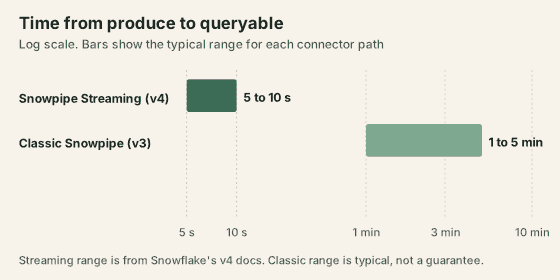
| Path | Latency | Delivery and ordering | Schema handling | Who runs it |
|---|---|---|---|---|
| Classic Snowpipe (v3 connector) | Minutes, typically 1 to 5 | At-least-once, file based | VARIANT columns by default | You, on your Connect cluster |
| Snowpipe Streaming (v4 connector) | 5 to 10 seconds (Snowflake docs) | Exactly-once, ordered (Snowflake docs) | Schematization on by default | You, on your Connect cluster |
| Confluent Cloud managed sink | Depends on connector settings, so measure it | Per the connector documentation | Schema Registry integration | Confluent |
Path 1: classic Snowpipe through the v3 connector
The connector buffers messages from Kafka topics and writes them to an internal Snowflake stage as files when a threshold is hit, by time, memory or message count. It then triggers Snowpipe to ingest the staged files into the target table.
By default each table gets two VARIANT columns. RECORD_CONTENT holds the message payload and RECORD_METADATA holds topic, partition, offset, key, timestamp and schema ID. You query nested fields with Snowflake's VARIANT syntax, for example record_content:user_id::string, or flatten them in views and downstream transformations.
Latency is bounded by Snowpipe's file ingestion, so think in minutes. That is fine for reporting and analytics. It is the wrong fit when sub-minute freshness matters.
One operational detail from this path: Snowflake polls the insertReport API for one hour. If a file's status cannot be confirmed in that window, the connector moves the file to a table stage. It is rare, but it shows up during Snowflake service disruptions, so monitor task status and Snowflake pipe status independently.
Path 2: Snowpipe Streaming through the v4 connector
Snowpipe Streaming is a different mechanism. Rather than staging files and triggering a batch, it writes rows through an ingestion client straight into Snowflake. The v4 connector is built on Snowflake's high-performance Snowpipe Streaming architecture, and Snowflake documents up to 10 GB/s throughput and 5 to 10 seconds end to end, with exactly-once and ordered delivery.
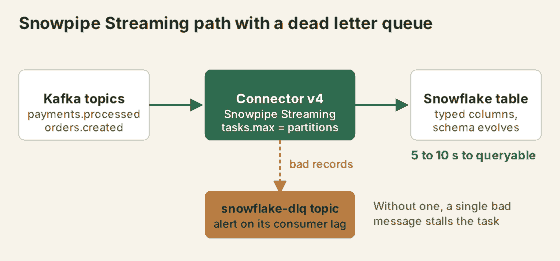
Schematization is on by default in v4, so each top-level field becomes a typed column and the record_content:field::type casting disappears from your SQL. You can restore the v3 behaviour with snowflake.enable.schematization=false if you need the VARIANT layout.
Things to know before you migrate or start fresh:
- v4 is a new connector, not an upgrade. It needs a new connector class and new configuration. It has mandatory startup validation that stops you running v4 with a copied v3 config, and forces explicit choices on schematization, validation mode and offset migration.
- Identifiers are case-sensitive. v3 normalised and sanitised names. v4 preserves case and special characters, so column names in existing tables need a check.
- Migration is manual and time-boxed. It has to happen within the Kafka offsets retention window,
offsets.retention.minutes, which defaults to seven days. - Errors need a destination. Set
errors.tolerance=alland a dead letter queue topic through the standard Connect error-handling settings so a malformed record is parked instead of blocking a task. - v3 is still supported. Snowflake lists it as officially supported and recommends moving to v4. The documentation I checked does not state an end-of-life date for v3, so confirm the current position before planning around one.
Path 3: the managed sink on Confluent Cloud
If you run Confluent Cloud, the fully managed Snowflake sink connector means there is no Connect cluster to provision, patch or scale. You configure it through the console or API and Confluent runs it. It integrates with Schema Registry for Avro and Protobuf.
The trade is cost and control. Confluent bills managed connectors on throughput per GB plus a per-task hourly rate, and the current rates are on its pricing and cost estimator pages. Whether it pays off depends on what a self-managed Connect cluster costs you. I have operated a self-hosted Kafka Connect cluster, and whichever way you go, count the recurring work of upgrades, task failures and connector configuration, not just the VM bill.
Production lessons
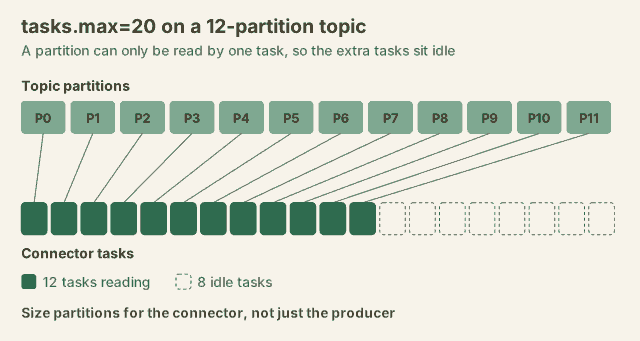
Partition count sets your parallelism ceiling. A partition is read by exactly one task. With 12 partitions and tasks.max=20, you get 12 working tasks and 8 idle ones. Size partitions for the downstream connector, not only for producer throughput.
Ordering holds within a partition, not across them. Rows from one partition arrive in offset order. Across partitions there is no global order. If a query needs a total ordering, handle it in SQL with event timestamps or the offsets in the metadata.
Dead letter queues are not optional. Without one, a single malformed record can stall a task until someone resolves it by hand. With one, bad records are routed aside and the pipeline keeps moving. Alert on the DLQ topic's consumer lag, because a growing DLQ is a data quality incident you want to hear about early.
Reprocessing happens outside the connector. Replays and DLQ re-drives are your code, so write the downstream load as an idempotent MERGE even when the connector documents exactly-once semantics.
References
- Snowflake Kafka connector overview, docs.snowflake.com
- Snowpipe Streaming documentation, docs.snowflake.com, Snowpipe Streaming
- Snowflake Kafka connector v4, docs.snowflake.com, v4 connector
- Migrate from v3 to v4, docs.snowflake.com, migration guide
- Snowflake connector for Kafka on Confluent Hub, confluent.io/hub
- Confluent Cloud Snowflake sink connector, docs.confluent.io
Frequently asked questions
What is the difference between Snowpipe and Snowpipe Streaming?
Classic Snowpipe loads from staged files: the v3 connector buffers messages, writes files to an internal stage and triggers Snowpipe, so latency is measured in minutes. Snowpipe Streaming uses a row-level ingestion path with no staging files. The v4 connector is built only on the high-performance Snowpipe Streaming architecture, and Snowflake documents 5 to 10 seconds end to end for it.
Does the Kafka connector guarantee exactly-once delivery to Snowflake?
Snowflake documents exactly-once and ordered delivery semantics for the v4 connector. Replays, dead letter queue reprocessing and backfills happen outside the connector, so an idempotent MERGE in downstream transformations is still a sensible safeguard for tables where a duplicate row is expensive.
Can I write to an existing Snowflake table or does the connector create new tables?
The connector can load into existing tables and can create a table if it does not exist. On the v3 path the connector adds RECORD_CONTENT and RECORD_METADATA columns, so every other column must allow NULL. On the v4 path, schematization is on by default and fields map to individual columns. Check the identifier rules before pointing it at an existing table, because v4 is case-sensitive and keeps special characters.
Which data formats does the Snowflake Kafka connector support?
JSON, Avro through the Confluent Schema Registry converter, and Protobuf through a protobuf converter. For binary payloads that need reliable schema management, Avro or Protobuf with a registry is the safer route.
Should I use the v3 or v4 Snowflake Kafka connector for a new implementation?
Start with v4. Snowflake lists it as generally available and recommends upgrading from v3, which remains officially supported. v4 needs a new connector class and new configuration, schematization is on by default, and migration from v3 is manual and has to happen inside the offsets retention window, which defaults to seven days.